

How webgate400 works
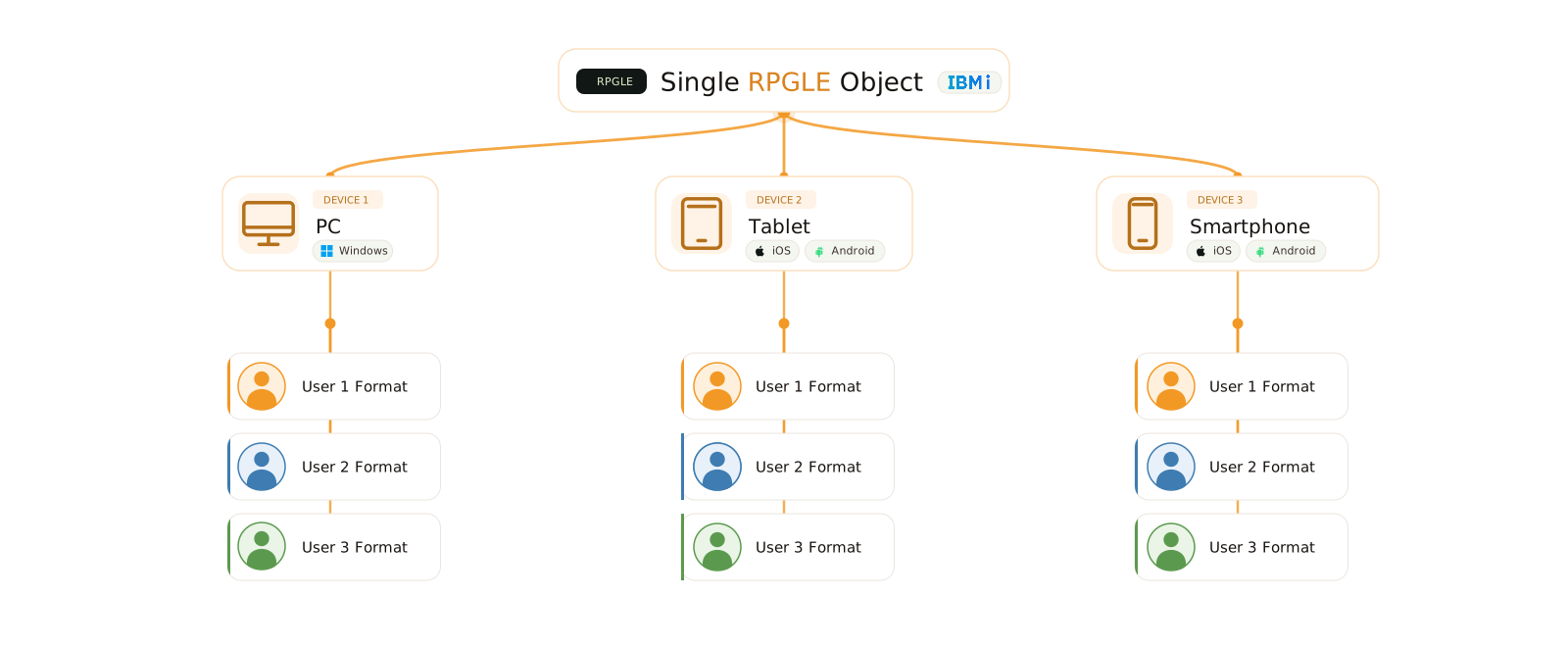
Rewriting an IBM i ERP application from scratch may seem like the most obvious solution. In reality, it is often the riskiest: multi-year projects, uncontrolled costs, and business logic rebuilt on less stable systems. More often than not, the final result is not worth the risk.
webgate400 is the alternative path. It is modern, responsive, high-performance UI development middleware that brings your RPG and COBOL applications to Windows, browsers, smartphones, and tablets without touching program logic and without leaving the IBM Power System platform.
Choosing webgate400 means protecting the investment made over the years in business logic while providing a user interface that stands comparison with the most advanced web-native systems.
Fewer risks, lower costs, maximum performance.
How to use webgate400
Configuration
The first step is to define the libraries containing the source code, objects, and rules for automatically recognizing options, function keys, and fixed screen elements. This is a one-time operation performed through a dedicated application function.
Daily operations
For code editing, you use the traditional functions for modifying display formats and programs, with no additional activities. The additions needed for the graphical version are included directly in the source code and do not need to be reapplied after changes. For compilation, you run the “WG” option, which is defined automatically during installation.

Multiple functions, one screen: all the data you need always at your fingertips
Each screen can combine multiple applications at the same time, putting data from different business areas at your fingertips: open orders, bills of materials, cost analysis, attachments, and much more.
Application data can be synchronized through webgate400 functions, organized, and displayed in charts, giving you both an overview and detailed insight without having to search through different applications.
A single API lets you create and distribute instant push notifications to any iOS or Android device. Simply log in with the power-b app to automatically enable a device to receive them. Each notification can be linked to a program related to the message, minimizing downtime.

Additional automatic features
- Print Box: view and download all printouts produced in PDF, TIFF, TXT, and HTML format, including spool previews and printout display.
- WG Bookmarks: create a list of the most frequently used programs for quick access without using the menu.
- WGFile Manager: manage and transfer files between the user’s computer and the IBM Power System.
- Internal Viewer: view documents and/or web pages in a hideable, resizable side panel.
- File Downloader: export DB2/400 files in Excel, XML, and TXT formats.
- Data Interceptor: save specific screen data to a text file when a given event occurs.
- Shared Notes: create, notify, and share graphical notes among all webgate400 users.
- SQL Beautifier: compose SQL statements (including stored procedures and UDFs) through a dedicated wizard.
- System Utilities: run the main user/system functions (wrkactjob, wrkusrjob, dspmsg user and sysopr, dspjoblog) directly from the client.
Your interface modernizes automatically,
without manual intervention
The first step of modernization is completely automatic. Function keys and subfile options are placed in practical ribbons, fields with multiple values become combo boxes, and date and numeric fields are enhanced with calendars and calculators. Applications become multitasking and multi-company.
The subfile is also modernized by becoming a table, with automatically recognized column headers and multi-header support. Each user can change column order, layout, and size, lock or hide columns, add new ones, filter and hierarchize information, export to Excel, save their configurations, and return to the initial setup at any time.
The same program and the same display file, without any code changes, can run on desktop, in a browser, on a smartphone, or on a tablet, with content, size, and functionality customized by user, device, and privacy settings.
webgate400 also includes online help linked to individual fields (viewable through tooltips), screens, functions, and menus. With the PSG Report Editor add-on module, automatic, customizable reports can be generated from any screen in just a few clicks.

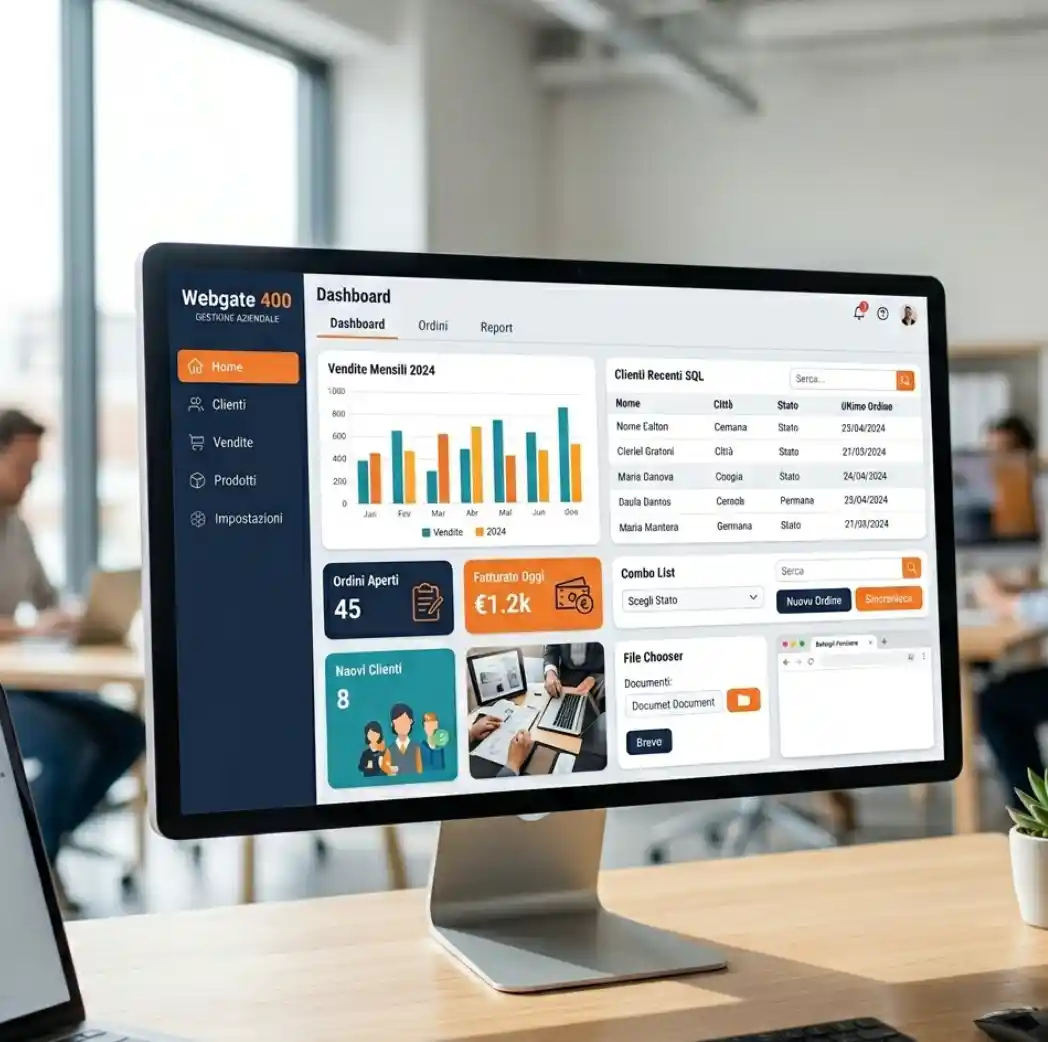
Enrich your applications with graphical objects and new features, without modifying the code
With a further modernization step, applications can be enriched with graphical objects positioned as needed: Frames, Tabs, Images, Charts, Links, Icons, Button Images, Combo Lists, Search functions, LOB Fields, File Choosers, Browser Fields, SQL Objects, Tile Objects, and more.
Each screen can be integrated with customizations that require no code changes: new queries, charts, SQL-generated tables, formulas, and exit programs. Available elements include Custom Command Service, Data Downloader, Tabs, Synchronizations, XML Import, Generic Calculations, Graphical Panels, and much more.
webgate400 offers an updated, user-friendly design that can create screens in native graphical mode with DDS compilable into display files, moving away from SDA and eliminating the use of text-mode screens.

Navigate between programs without re-entering data
Modernization also transforms the way users navigate the application: from transactional to navigable. Thanks to Command Service, you can “anchor” native AS/400 programs, SQL statements, and PC executables to any application field based on the full or partial field name and its nature, passing static or dynamic parameters.
Command Services are divided into: More Info (double click), Generic (menu or toolbar), Link (connection to Database Link), and Drag & Drop.
Evolution, not revolution
For nearly 25 years, one principle has never changed: don’t become a company forced to chase technology; stay focused on what you do best in your industry.
Our job is to give you the tools to stay competitive, modern, secure, and scalable without losing what already works today.